Database
The database related functionality of this application deals with
-
Consistency of Subordinates
-
Indices
Consistency of Subordinates
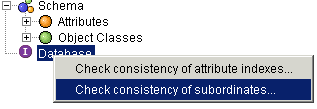
In order to check the consistency of subordinates, just apply the right mouse key to the database node in the schema view and select "Check consistency of subordinates" (but be aware that while the check is running no updates are possible):
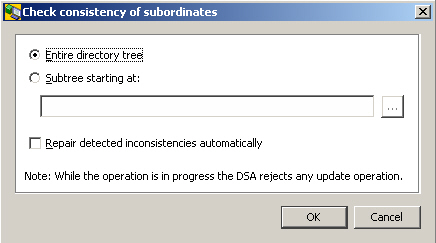
You can
-
have the server check the entire tree or a specified subtree.
-
have it automatically repair inconsistencies encountered during the check.
Indices
The purpose of indices is to enable the server to respond as quickly as possible to search queries. In a nutshell, indices are the more beneficial the larger the database - and they are absolutely essential for searching large databases.
You can have the server create and maintain indices on a per attribute basis. These types of indices are available:
-
Index
Optimizes the performance of search queries with a filter that contains an equality, greater or equal, less or equal, or approximate (aka "sounds like") match item or an initial (aka "begins with") or final substring (aka "ends with") in the targeted attribute. -
Contains (only possible in addition to "Index")
Optimizes the performance of search queries with a filter that contains substrings that can be positioned anywhere in the targeted attribute (aka "contains", "contains any word of", "contains each word of" and the like). -
Any (only possible in addition to "Index")
Optimizes the performance of search queries with a filter that checks for the presence of the targeted attribute, i.e. that checks if the targeted attribute has a whatever value (attribute is present) or no value (attribute is not present). Note that a search such as objectClass="*" is equivalent to "objectClass is present" -
Approximate (only possible in addition to "Index")
Optimizes the performance of search queries with a filter that contains sounds-like filter items (phonetic matching).
Since indices can take up a considerable amount of disk space, it might make sense to consider for each attribute in question whether it is worth or not to have the server maintain an index for it. While in a typical directory that stores users, attributes such as commonName and surname are typical candidates for indices, it appears questionable if it pays to have the server maintain indices for attributes such as givenName or initials. The server is smart enough to adequately handle queries containing both, indexed attributes and attributes that are not indexed.
Indices can created with UNIQUE constraint. The UNIQUE constraint proves uniqueness of attribute values. (See the dirxadm db operation for details.)
The index management property panes differ depending on if they are in read mode or in edit mode.
Indices: Read Mode
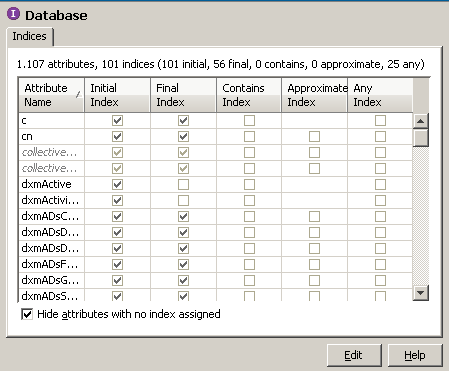
The example below shows a screenshot of the respective pane (which is associated with the database node in the schema view) in read mode. For your convenience, it displays the number of indexed attributes on top. Note that the number of attributes that can have an index is limited (refer to the dbamboot command of DirX Directory).
Notes
-
Inherited attributes are shown italic/gray. A tooltip shows the name of the supertype.
-
If you want to hand over the current settings to somebody else, you may select the entire table, copy it into the clipboard and paste it into another program, for example a spreadsheet program.
Indices: Edit Mode
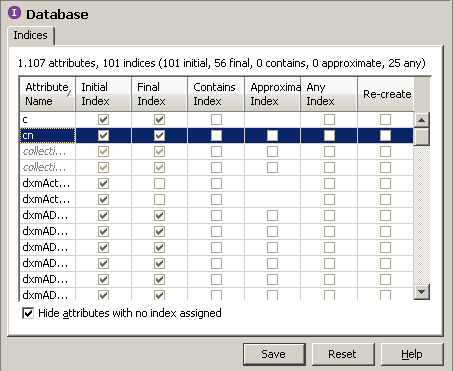
The example below shows a screenshot of the respective pane (which is associated with the database node in the schema view) in edit mode. For your convenience, it displays the number of indexed attributes on top. Note that the number of attributes that can have an index is limited (refer to the dbamboot command of DirX Directory).
Notes
-
Inherited attributes are shown italic/gray. A tooltip shows the name of the supertype.
-
Your current, yet unconfirmed settings are highlighted gray (check the affected checkbox(es) in the column titled "Recreate" and click the Save button).
-
You can have the server recreate one or more indices you feel to be corrupted.
-
If you have the server create a certain type of index for an attribute that acts as supertype (aka superior) of other attributes, all those attributes will inherit that index, too. Inherited attributes are shown italic/gray.
-
You cannot remove an index from an attribute that has a supertype/superior.
-
When removing an already existing index from a supertype attribute, the indices of the inheriting attributes will not be removed implicitly.
Consistency of Indices
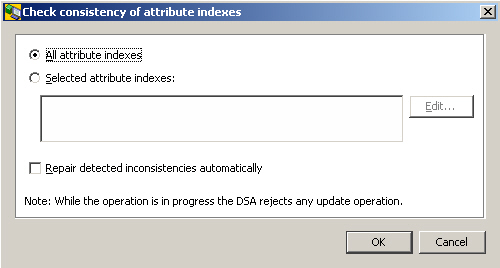
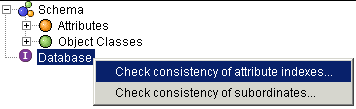
In order to check the consistency of indices, just apply the right mouse key to the database node in the schema view and select "Check consistency of attribute indices" (but be aware that while the check is running no updates are possible):
You can
-
have the server check the entire tree or a specified subtree.
-
have it automatically repair inconsistencies encountered during the check.