Monitoring Information Provided by the LDAP Server
The Monitoring view exposes administrative information provided by the LDAP server through LDAP extended operations. (See the dirxextop reference page in the DirX Directory Administration Reference for details about LDAP extended operations.)
The source of the administrative information is either the LDAP server itself, for example LDAP process info, or the DSA the LDAP server is connected to, for example DSA exceptions. Though some values are supposed to be fairly self-explanatory, this sort of information mainly addresses maintenance staff.
The functionality provided is about
-
LDAP monitoring
-
DSA monitoring
It is organized into several property panes. Artificial nodes found in a tree pane just left to it allow switching between those panes.
You can have the display refreshed through:
-
the F5 key
-
the Refresh button in DirX Directory Manager’s toolbar
-
switching between the monitoring panes
-
activating the auto-refresh setting that is available at the end of most monitoring panes

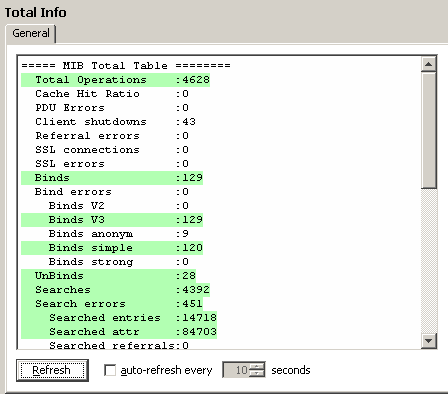
Values that have changed since the previous refresh are highlighted in green color:
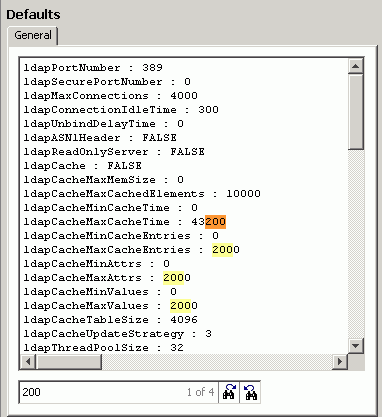
Specify a text string in the search panel at the bottom to search the displayed text:

Press  to go to the next hit and
  to go to the previous hit. All hits are highlighted in yellow. The current hit is highlighted in orange:
LDAP Monitoring
This section provides information about LDAP monitoring:
-
LDAP Defaults
-
LDAP Extended Operations
-
LDAP Configuration
-
LDAP User Policies
-
LDAP Proxy Server
-
LDAP MIB
-
LDAP Cache
-
LDAP CTX Info
-
SSL Cipher Names
-
LDAP Audit
-
LDAP Process Info
-
LDAP Exceptions
LDAP Defaults
Lists the defaults that apply when a value is missing in any LDAP Configuration Subentries.
See also DirX Directory Manager’s Configuration view.
LDAP Extended Operations
Displays information about LDAP extended operations. You can display the following information:
-
Extop-Info:
Lists the object identifiers (OIDs) and the LDAP names of the supported LDAP extended operations. -
Show Privileged User
The LDAP configuration subentry provides a set of attributes for managing the accessibility to LDAP extended operations. This operation displays the values of the attributes specifying the user’s privileges. These attributes are: -
ExtOp ADMIN users: users that can perform all LDAP extended operations.
-
ExtOp READ users: users that can perform all LDAP extended read operations. The LDAP extended read operations are specified in the LDAP Extended Read Operations attribute.
-
ExtOp EXEC users: users that can perform all LDAP extended execute operations. The LDAP extended execute operations are specified in the LDAP Extended Execute Operations attribute.
-
ExtOp MONITORING users: users that can perform all LDAP extended monitoring operations. The LDAP extended monitoring operations are specified in the LDAP Extended Monitoring Operations attribute.
-
Show Required Privileges
This operation displays which privilege is required for which LDAP extended operation; that is in which attribute listed above the user’s distinguished name must be contained. The information is displayed in tabular format. The columns provide the following information: -
The LDAP name of the LDAP extended operation.
-
The object identifier of the LDAP extended operation.
-
The privilege required for this operation: READ, EXEC, MONITORING or NO privilege. To perform the LDAP extended operation the user’s distinguished name must be contained in the associated attribute. (See "Show Privileged User" above.)
-
Whether the required privilege for performing the operation is either the default one or is derived from the attributes LDAP Extended Read Operations, LDAP Extended Execute Operations, LDAP Extended Monitoring Operations.
For details about LDAP extended operations, see the dirxextop reference page in the DirX Directory Administration Reference. For details about access management for LDAP extended operations, see "DirX Directory Attributes -> X.500 User Application Attributes -> Attributes for LDAP Server Configuration -> Attributes Controlling LDAP Extended Operations" in the DirX Directory Administration Reference.
LDAP Configuration
Displays configuration and statistical information regarding LDAP configuration. Furthermore, it is possible to update configuration attributes. You can:
-
Display the current values for the attributes of the LDAP server’s configuration subentry. A plus sign (+) next to an attribute indicates that it is available for dynamic update.
-
Display the current values for the attributes of the LDAP server’s SSL configuration subentry.
-
Display the current values for the attributes of an LDAP server’s audit configuration subentry.
-
Display the list of attributes available for dynamic update.
-
Activate changes to specific attributes dynamically. Using dynamic update allows changes to the LDAP server configuration to be applied without the effects of an LDAP server re-start (permanent loss of client connections to the server and temporary loss of the service itself).
-
Get information about the changes made over time to the LDAP server’s configuration subentry. The most recent changes appear at the top of the list.
LDAP User Policies
Displays configuration and statistical information regarding LDAP user policies. You can
-
Display the currently active user and group policies.
-
Display the status of all registered users.
-
Display all rules that apply to the specified user. Specify the user’s distinguished name in LDAP format or one of the following keywords:
-
all-returns the rules that apply to all users.
-
anonymous-returns the rules that apply to anonymous users.
LDAP Proxy Server
Displays and updates the configuration of a DirX Directory LDAP Proxy server. You can
-
Display the current status and configuration of the LDAP Proxy server.
-
Update the proxy settings from a configuration file.
LDAP MIB
The LDAP server’s Management Information Base is a subset of the specifications of the recommendation entitled Directory Server Monitoring MIB (RFC 2605) that correspond to the LDAP server and some additional information like the LDAP server’s configuration.
The information exposed through the LDAP MIB is organized into:
-
Static MIB
The LDAP MIB static table stores information that is usually set during initialization performed at start time of the LDAP server. It remains unchanged during lifetime of the LDAP server process. -
Total MIB
The LDAP MIB total table stores information that is accumulated during lifetime of the LDAP server. Usually this information increases and delivers a temporary snapshot of the running LDAP server. -
Current MIB
The LDAP MIB current table stores information that is accumulated during lifetime of the LDAP server. Usually this information increases and decreases, reflects some status information (Status), for example LDAP cache enabled (ON) and LDAP cache information is valid (valid), or provides the maximum value (MaxCounter) during LDAP server’s lifetime. -
Associations MIB
The LDAP MIB association table stores information that is dynamic concerning the content of the entire table and the values of each MIB attribute stored. It provides information concerning the number of LDAP client connections established, general information about each LDAP connection, and all operations running for each LDAP client connection. -
Environment MIB
This table contains the current environment strings as they are known by the server.
See the appendix "LDAP MIB Tables" in the DirX Directory Administration Reference for details.
Additionally, you can
-
Dump all information stored in the LDAP MIBs to a file. This operation writes the information in all MIB tables except the MIB association table to the file mib*pid.txt* where pid is the process ID of the LDAP server. This file is written to the same directory as the usual log files, by default to the directory install_path*/ldap/log*.
-
Display the LDAP server operation statistics of the last recent 24 hours.
-
Display the LDAP server paged searched result cookie table.
LDAP Cache
Displays configuration and statistical information regarding the LDAP cache. Furthermore, it is possible to manage the LDAP cache. You can:
-
Display configuration information and statistical information about the LDAP cache.
-
Start caching of LDAP search results. All subsequent LDAP search operations query the LDAP cache first. The request is only directed to the DSA if the search result cannot be found in the LDAP cache.
-
Stop caching of LDAP search results. All subsequent LDAP search operations are directed to the DSA.
-
Dump configuration information, statistical information, and all saved results of the LDAP cache.
-
Clear the content of the LDAP cache. All LDAP search results are removed from the cache.
LDAP CTX Info
Displays a summary of the internal CTX memory consumption of the LDAP server. (CTX is the internal memory management system of DirX Directory.)
It also shows the maximum limit of usable memory of CTX together with the current size and historical high-water-mark (HWM).
LDAP SSL
Displays information about LDAP SSL connections. Furthermore, it is possible to manage the LDAP SSL logging and the LDAP SSL context. The following operations are available:
-
Cipher Names
Displays all cipher names that can be specified in the LDAP supported encryption strength attribute (supportedEncrytionStrength, LDAP Supported Encryption Strength). The default value of this attribute is RSA: all cipher suites that use the RSA algorithm are accepted. (See "LDAP Supported Encryption Strength" in the DirX Directory Administration Reference for details.) -
Create New Context (CRL Refresh)
Triggers the renewal of the CRLs that the LDAP server uses to check user certificates in the context of LDAP SASL binds. The CRLs are updated with the content of the files configured in the attribute LDAP SSL CRL Filenames. -
Context-List Info
Displays the list of created SSL contexts in use. -
SSL Logging ON
Enables LDAP SSL logging. -
SSL Logging Status
Displays the LDAP SSL logging status. -
SSL Logging OFF
Disables LDAP SSL logging. -
SASL VerifyErr History
Displays the last recent SASL certificate verification errors.
See "Attributes for LDAP Server SSL Configuration" in the DirX Directory Administration Reference for details.
LDAP Audit
Displays configuration and statistical information regarding LDAP auditing. Furthermore, it is possible to manage LDAP auditing, and evaluate LDAP audit logfiles. You can:
-
Display configuration and statistical information about LDAP auditing.
-
Start the recording of LDAP server audit information using the most recently read values of the LDAP audit configuration subentry. This operation has no effect on the value of the LDAP Audit On attribute of the LDAP audit configuration subentry that is evaluated at LDAP server’s start-up time and when you perform a dirxadm ldap audit -config operation.
The operation displays the full path name of the LDAP audit log file. -
Stop the recording of LDAP server audit information. This operation has no effect on the value of the LDAP Audit On attribute of the LDAP audit configuration subentry that is evaluated at LDAP server’s start-up time and when you perform a dirxadm ldap audit -config operation.
-
Evaluate and display the content of the current LDAP audit log file. This operation may last some time depending on the file size.
-
Evaluate and display erroneous operations logged in the current LDAP audit log file. This operation may last some time depending on the file size.
LDAP Process Info
Provides a set of tools to analyze process internal information. Some tools for example top, pfiles or netstat are executed remotely on the server and the resulting output is returned to the caller. Other tools for example BT-Dump or IDM-Hdl-Dump provide internal information of the server and require special knowledge to interpret the output. (Please note that not all tools are available on all platforms.)
The following tools are provided:
-
PStack - Displays the current thread stacks of the LDAP server process. This tool is not available on Windows systems.
-
BT-Dump - Displays the DAP bind table entries.
-
IDM-Hdl-Dump - Displays the IDM-Handle-Information of the LDAP server process.
-
RUsage - Displays LDAP server process-specific system resource information. This tool is not available on Windows systems.
-
Pfiles - Displays LDAP server process-specific file descriptor usage. This tool is not available on Windows systems.
-
Top - Displays LDAP server top-process information. This tool is not available on Windows systems.
-
Status - Displays LDAP server process status information. This tool is not available on Windows systems.
-
Pmap - Displays process memory mapping table of the LDAP server process. This tool is not available on Windows systems.
-
Netsat - Displays the TCP/IP information of all active connections.
DSA Monitoring
This section provides information about DSA monitoring:
-
DSA MIBs
-
DSA CTX Info
-
DSA Audit
-
DSA Process Info
-
DSA DBAM
-
DSA Exceptions
-
DSA dirxadm
DSA MIBs
The Management Information Base of the DSA and the applications is a subset of the specifications. See RFC 1565 for a definition of the Application MIB (also called the Network Services Monitoring MIB) and RFC 1567 for a definition of the DSA MIB (also called the X.500 Directory Monitoring MIB).
The information exposed through the DSA MIBs is organized into:
-
NMI Show
Displays the information in all MIB tables. -
NMI DAP Show
Displays the information of the DSA DAP MIB table. -
NMI DSP Show
Displays the information of the DSA DSP MIB table (information about operations for chaining. -
NMI DISP Show
Displays the information if the DSA DISP MIB table (information about shadowing operations). -
DISP Flow Counters
Displays information about DSA DISP update flow counters. -
24h History DAP
Displays the DSA operation statistics for DAP operations of the last recent 24 hours. -
24h History DSP
Displays the DSA operation statistics for DSP operations of the last recent 24 hours. -
24h History DISP
Displays the DSA operation statistics for DISP operations of the last recent 24 hours. -
DISP Monitor
Displays detailed information about DISP status, for example information about switch or number of established SOBs. -
Paging Info
Displays detailed bind table information about paged search results. -
DBAM Index Info
Displays information about the database index configuration. See the dirxadm db attrconfig operation reference page in the DirX Directory Administration Guide for details about indexes.
DSA CTX Info
Displays a summary of the internal CTX memory consumption of the DSA. (CTX is the internal memory management system of DirX Directory.)
It also shows the maximum limit of usable memory of CTX together with the current size and historical high-water-mark (HWM).
DSA Audit
Displays configuration and statistical information regarding DSA auditing. Furthermore, it is possible to manage DSA auditing, and evaluate LDAP audit logfiles. You can:
-
Display configuration and statistical information about DSA auditing.
-
Evaluate and display the content of the current DSA audit log file. This operation may last some time depending on the file size.
-
Enable DSA audit logging. Audit transactions that affect attributes and attribute values are logged. This setting is not preserved after restarting the DSA.
-
Disable DSA audit logging. This setting is not preserved after restarting the DSA.
DSA Process Info
Provides a set of tools to analyze process internal information. Some tools for example top, pfiles or netstat are executed remotely on the server and the resulting output is returned to the caller. Other tools for example BT-Dump or IDM-Hdl-Dump provide internal information of the server and require special knowledge to interpret the output. (Please note that not all tools are available on all platforms.)
The following tools are provided:
-
PStack - Displays the current thread stacks of the DSA process. This tool is not available on Windows systems.
-
BT-Dump - Displays the DAP bind table entries.
-
IDM-Hdl-Dump - Displays the IDM-Handle-Information of the DSA server process.
-
RUsage - Displays DSA process-specific system resource information. This tool is not available on Windows systems.
-
Pfiles - Displays DSA process-specific file descriptor usage. This tool is not available on Windows systems.
-
Top - Displays DSA top-process information. This tool is not available on Windows systems.
-
Status - Displays DSA process status information. This tool is not available on Windows systems.
-
Pmap - Displays process memory mapping table of the DSA process. This tool is not available on Windows systems.
-
IOstat - Displays information about input and output traffic of the DSA process. This tool is not available on Windows systems.
-
Netsat - Displays the TCP/IP information of all active connections.
DSA DBAM
The DBAM MIB information provides statistical information for several DBAM subsystems. DirX Directory Manager provides the following operations to manage the DBAM MIB and to display the information contained:
-
DBAM Mib start
Enables the DSA DBAM MIB or displays the date when the DSA DBAM has been enabled. -
DBAM Mib show
Displays the content of the DBAM MIB tables. See the appendix "DBAM MIB Tables" in the DirX Directory Administration Reference for details on the content of the DBAM MIB tables. -
DBAM Mib stop
Disables the DSA DBAM MIB. -
DBAM DevInfo
Displays information about the capacity of the logical and the attribute index specific devices of the database. See the dbamdevinfo reference page in the DirX Directory Administration Reference for details. -
DBAM Config
Displays a detailed list of database profile properties. See the dbamconfig reference page in the DirX Directory Administration Reference for details. -
DBAM Preload Status
Displays the status of the DBAM buffer cache preloader. -
DBAM Preload On
Starts the DBAM buffer cache preloader. -
DBAM Preload Off
Stops the DBAM buffer cache preloader.
DSA Exceptions
Displays the current exception log file of the DSA. This operation is not available on Windows systems.
DSA dirxadm (DirX Directory Server V8.10 or higher only)
These operations are supported only by DirX Directory servers installed on Linux systems.
Performs a dirxadm operation in a DSA that can only be accessed via the LDAP protocol. The dirxadm operation is sent to this DSA via the LDAP extended operation dsa_dirxadm_cmd. The transfer of the dirxadm command is performed via the LDAP extended operation, while the execution of the command is performed via the RPC protocol between dirxadm and the DSA.
The dsa_dirxadm_cmd operation requires the Execute permission; that is, the user’s distinguished name must be contained in the LDAP Extended Operations Execute Users or LDAP Extended Operations Execute Groups attribute of the LDAP server (or in the list/group of ExtOp administrators).
The dsa_dirxadm_cmd operation uses the bind operation specified in the environment variable DIRX_DSA_EXTOP_ADM_BIND to perform the dirxadm bind operation to the DSA.
The result of the dirxadm operation is displayed in the result window.
See the dsa_dirxadm_cmd reference page in the DirX Directory LDAP Extended Operations for details.
The following dirxadm operations are provided as predefined shortcuts. If the cmd node is selected, an input window allows you to enter any legal dirxadm command. Any command you can type into dirxadm can be entered in this cmd line.
-
show DirXDBVersion
Displays the attribute values of the DirXDBVersion subentry CN=DirXDBVersionSubentry. (See "DirX Directory In Sync", "DirX Directory Recent DN", "DirX Directory Recent MSN", "DirX Directory Recent MSN Time Stamp" and "DirX Directory Recent Operation" in "DirX Directory Attributes" -> "X.500 Directory Operational Attributes" in the DirX Directory Syntaxes and Attributes, and "Creating a Synchronous Shadow DSA" -> "Monitoring Data Synchronicity Status" -> "Using the DirXDBVersion Subentry" in the DirX Directory Administration Guide for details.) -
show GlobalPasswordPolicy
Displays the attribute values of the global password policy CN=GlobalPasswordPolicy. (See "DirX Directory Attributes" -> "X.500 User Application Attributes" -> "Attributes of the Password Policy Subentry" in the DirX Directory Syntaxes and Attributes and "Creating a Shadow DSA" -> "Password Policies in a Shadow Configuration" in the DirX Directory Administration Guide for details.) -
show LdapROOT
Displays the attribute values of the LDAP root subentry CN=ldapRoot. (See "DirX Directory Attributes" -> "X.500 User Application Attributes" -> "Attributes of the LDAP Root Subentry" in the DirX Directory Syntaxes and Attributes and "Setting up the DirX Directory Service" -> "Setting up the LDAP Server" -> "Creating the LDAP Server Subentries" in the DirX Directory Administration Guide for details.) -
show DB-Config
Displays the attribute values of the schema subentry CN=Schema. (See "DirX Directory Attributes" -> "X.500 User Application Attributes" -> "Attributes of the Schema Subentry" in the DirX Directory Syntaxes and Attributes and "Setting up the DirX Directory Service" -> "Setting up the LDAP Server" -> "Creating the LDAP Server Subentries" in the DirX Directory Administration Guide for details.) -
nmi show
Displays the information in all MIB Tables. (See "DSA MIBs" for details.) -
show Audit Status
Displays configuration and statistical information about DSA auditing. -
show RootDSE
Displays the attribute values of the root DSE /. The root DSE is created automatically during installation. -
show CPs
Searches and displays DNs whose DSEType indicates a context prefix (CP). -
show SUBRs
Searches and displays DNs whose DSEType indicates a subordinate reference. -
show all SOBs
Displays all shadowing agreements. -
show all LOBs
Displays all LDIF agreements. -
show DIT info
Displays details about the root DSE and context prefixes.
All these commands read data from the DirX Directory database. They do not change any data.
Additionally, the following specific operation is provided:
-
cmd
Provides an input line at the top where you can specify any legal dirxadm command. The dirxadm command must be given as one line of input (do not use wrap-around characters like \). Double quotes should not be needed. We do not recommend using this option to execute comprehensive commands like sob/lob create.