Single logout in DXA
What is Single Logout?
DirX Access provides a Single Logout functionality enabling users to log out from all interconnected applications via a single click. From the user’s perspective, when Single Sign-on is used, all the interconnected applications form a single context. Therefore, it is only natural that when they had to authenticated once, they will need to log out only once as well. In addition, this supports good security practices.
To specify the Single Logout (SLO) more, it is important to point out that it is really tightly connected to the Single Sign-on (SSO) mechanism. SSO produces and maintains an authenticated session, while SLO terminates and propagates the termination to all peers that have used this session (typically via federated protocols).
| SLO is not bound to user-account, meaning, if the user has multiple sessions (e.g., from multiple browsers or devices), SLO will only apply to the session where it was initiated. |
| Currently, the Single Logout functionality is divided based on the federation protocol. SAML-initiated SLO applies on DXA session and SAML Relying Parties (RPs), while OAuth/OpenID-initiated SLO applies on DXA session and OAuth/OpenID clients. This is likely to change in near future. |
Fine-grained Single Logout
While the general Single Logout is typically perceived as just click-once-logout-from-everywhere, in DXA it is additionally possible to configure more fine-grained behavior. Picture a scenario, where there are very different peers:
-
with different security levels (e.g., personalized weather forecast web-page vs. bank account management GUI),
-
using tokens with different timely aspects (e.g., “daily work” session vs. year-long mobile app OAuth refresh token),
-
in different user contexts (e.g., work tools vs. personal apps).
In such scenarios, it may be desired to have more control over which tokens are logged out automatically, which require user consent, and which are not logged out at all. To support such scenarios, DXA Single Logout configuration provides the following capabilities:
-
Selective logout based on whitelist or blacklist mode.
-
Ability to require user consent for specific peers.
-
Option to include or exclude the DXA session itself from the logout.
For different peers and use-cases, different configurations can be created.
How Single Logout works in DXA
Generally, during single logout DXA will:
-
receive a logout request,
-
identify all tokens connected to the session,
-
determine which peers must be logged out,
-
determine if the DXA session must be terminated,
-
send logout notifications via front-channel and/or back-channel mechanisms,
-
optionally prompt the user for consent for peers that require it,
-
internally invalidate tokens and the session (optionally).
Configuring Single Logout
Single Logout configurations can be edited or created in:
-
Configuration → Authentication → Logout → Single logout
The main configuration options are:
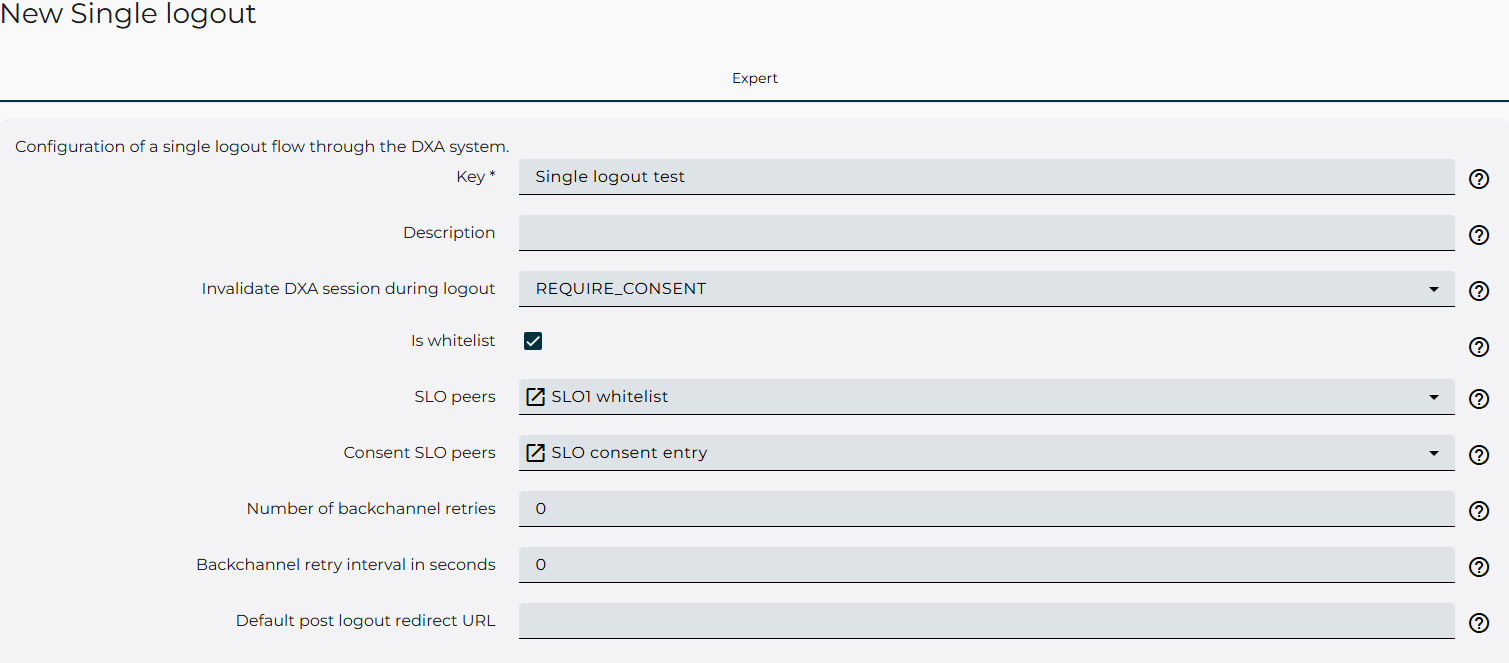
Invalidate DXA session during logout
Controls whether the local DXA session is invalidated when logout is initiated. If consent is required, the user will be prompted on the DXA logout page to consent the logout of the DXA session.
Is whitelist
Determines how SLO peers are interpreted:
-
If checked: Only the listed SLO peers (with active tokens) are logged out and notified.
-
If unchecked: All clients not listed as SLO peers are logged out and notified. If the SLO peers and Consent SLO peers are empty, the single logout will act as a true single logout and logout all the peers.
SLO peers
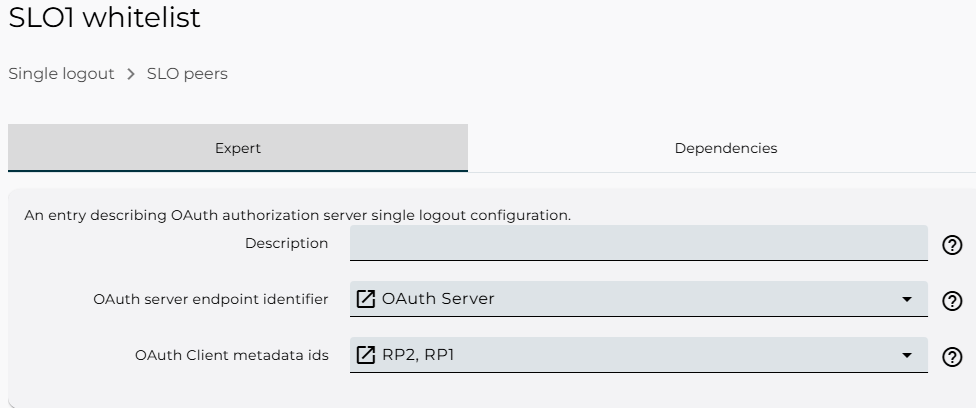
List of Single Logout peers. For OAuth Server, these represent OAuth clients whose tokens participate in logout, depending on whitelist mode. For the OAuth Server SLO, when acting as the OP, the OAuth authorization server single logout peer reference is used.
Entries of type OAuth client single logout peer are used to determine to what upstream OpenId providers is the logout propagated to, using the OpenId Rp initiated logout. These entries are applicable either when the logout is initiated from the Oauth client logout endpoint, or when the OAuth server is used as an identity proxy.
Example configurations Single logout
Below are a few use cases of how to configure the Single logout.
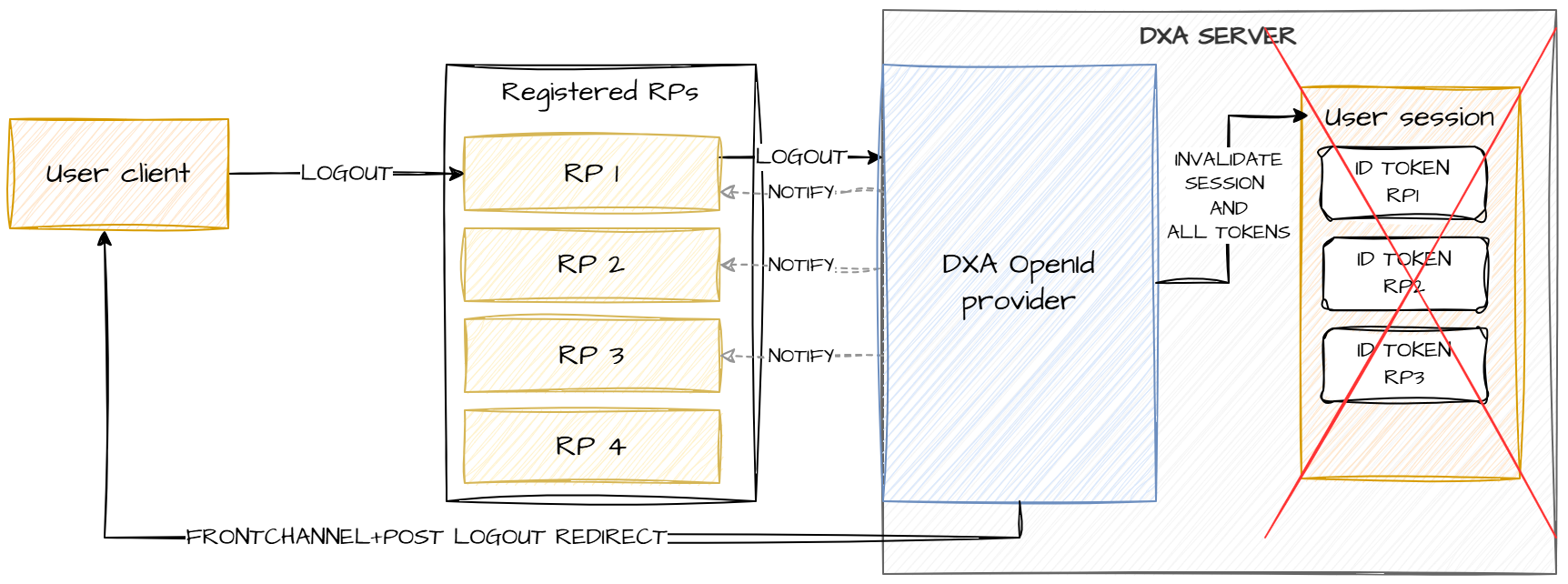
Logout all tokens and DXA session
The most basic scenario is, when it is desired to log out all the tokens issued in the session and the DXA session itself. This can be achieved by creating a Single logout configuration with:
-
Is whitelist: unchecked
-
SLO peers: empty
-
Consent SLO peers: empty
The scenario is shown in the figure below:
Always logout specific clients, require consent for other client
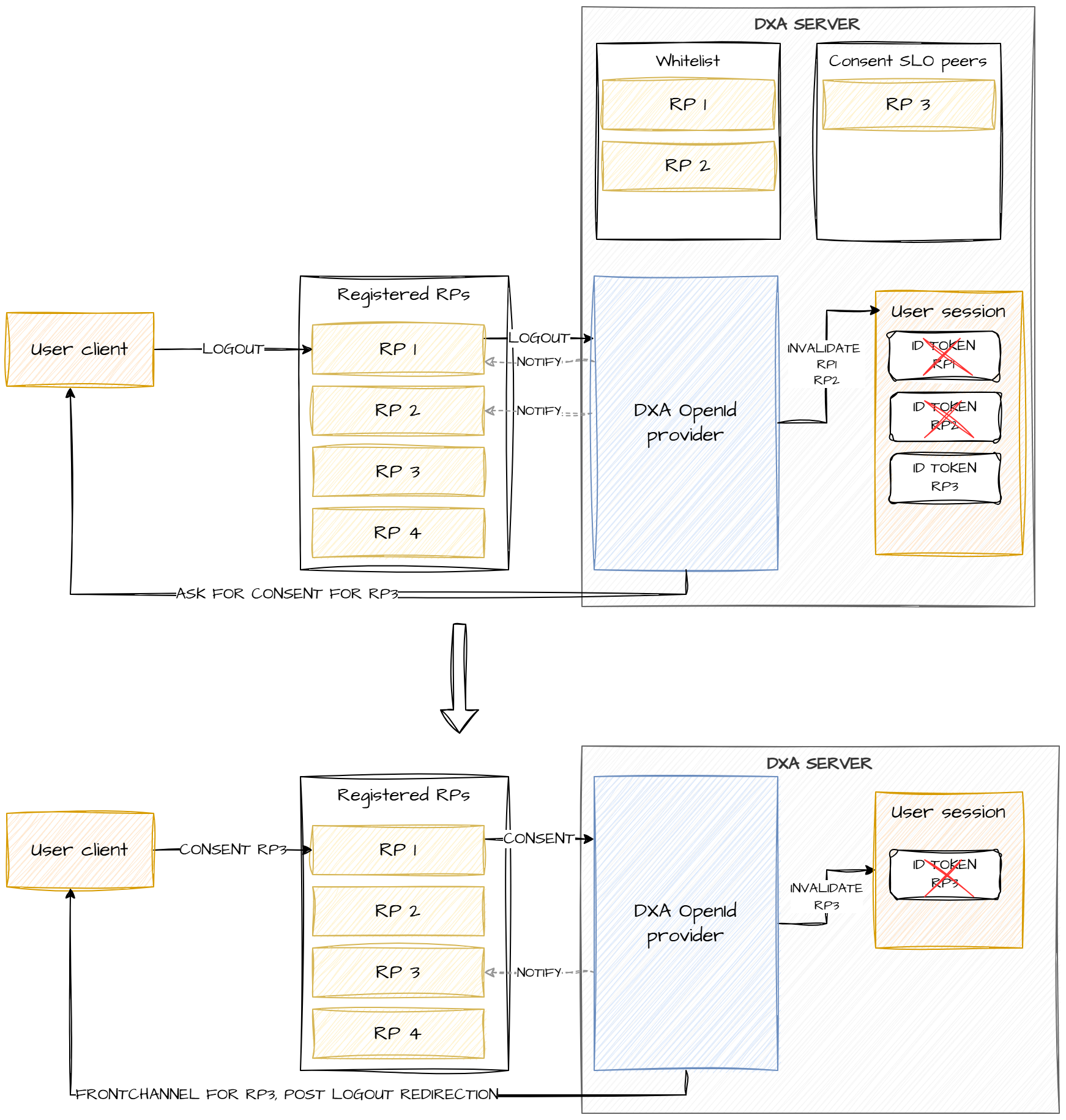
The following scenario shows how to always logout tokens from specific clients, while requiring user consent for some other clients. The demonstrated case includes four clients, for RP1, and RP2 the logout is always performed, while for RP3 the user is prompted for consent, RP4 is not logged out at all. For the DXA session, consent is also required.
An example of Single logout configuration to reference in OAuth server for this scenario in the DXA manager is shown in the figures below:
The scenario is depicted in the figure below: