OAuth single logout
DXA supports the following OpenID Connect logout specifications when acting as an OpenID Provider (OP):
Functionality of OAuth Single Logout when acting as a Relying Party (RP) is described in: Client side OAuth single logout.
Front-Channel vs Back-Channel Notifications
Front-Channel Logout
-
Browser-based iFrames for each RP (hidden iFrames nested in the DXA logout page).
-
Requires user agent.
-
RP typically destroys local session via browser.
Back-Channel Logout
-
Server-to-server request from DXA to RP including a logout token.
-
RP must validate the logout token and terminate local session.
-
Works even if user’s browser is closed.
-
The DXA server must be able to reach the RP server directly.
If a client registers both frontchannel_logout_uri and backchannel_logout_uri,
DXA uses both mechanisms.
High-Level OAuth Single Logout Flow
-
A logout request is received at the OP logout endpoint, that must include the
id_token_hintparameter. -
DXA extracts the
sidand identifies all tokens in the session. -
DXA determines:
-
which clients must be logged out,
-
which require consent.
-
-
If necessary, the user is shown a consent screen.
-
DXA sends:
-
Front-channel logout notifications,
-
Back-channel logout notifications.
-
-
DXA invalidates access/refresh tokens locally.
-
DXA optionally invalidates the DXA session itself.
-
User is redirected to the post-logout page.
Configuring OAuth Single Logout
To enable OAuth Single Logout:
-
Navigate to: Configuration → Federation → OAuth → Server endpoints → <your OAuth server>.
-
Create a new Protected endpoint: Protected endpoint type:
Logout. -
Assign a Single Logout configuration to this endpoint. The configuration of single logout is described in the section Single Logout.
OAuth Single Logout Behavior Overview
-
Logout is session-based. Only tokens issued using the same DXA session (same
sid) participate in logout. -
RP-Initiated Logout can only be triggered using an OpenID token, the
id_token_hintparameter is mandatory. -
DXA includes the
sidclaim in OpenID tokens. This value identifies the session and is used in logout notifications. All the tokens issued in the same session share the samesid. -
Clients request logout notifications by registering:
-
backchannel_logout_uri -
frontchannel_logout_uri -
If both are registered, both mechanisms are used.
-
-
Access and refresh tokens are also invalidated on the OP, but no notifications are sent for them (no standard exists).
-
If a client belongs to Consent SLO peers, the user is prompted to choose which tokens from this client should be logged out.
| For the policies regarding token invalidation and logout notifications, the system does not differentiate between client initiating the logout and other clients in the session. All clients are treated equally. Meaning if the client initiating the logout belongs to Consent SLO peers, the user will be prompted for consent for logging out this client’s tokens as well. |
Giving different logout permissions to different RPs
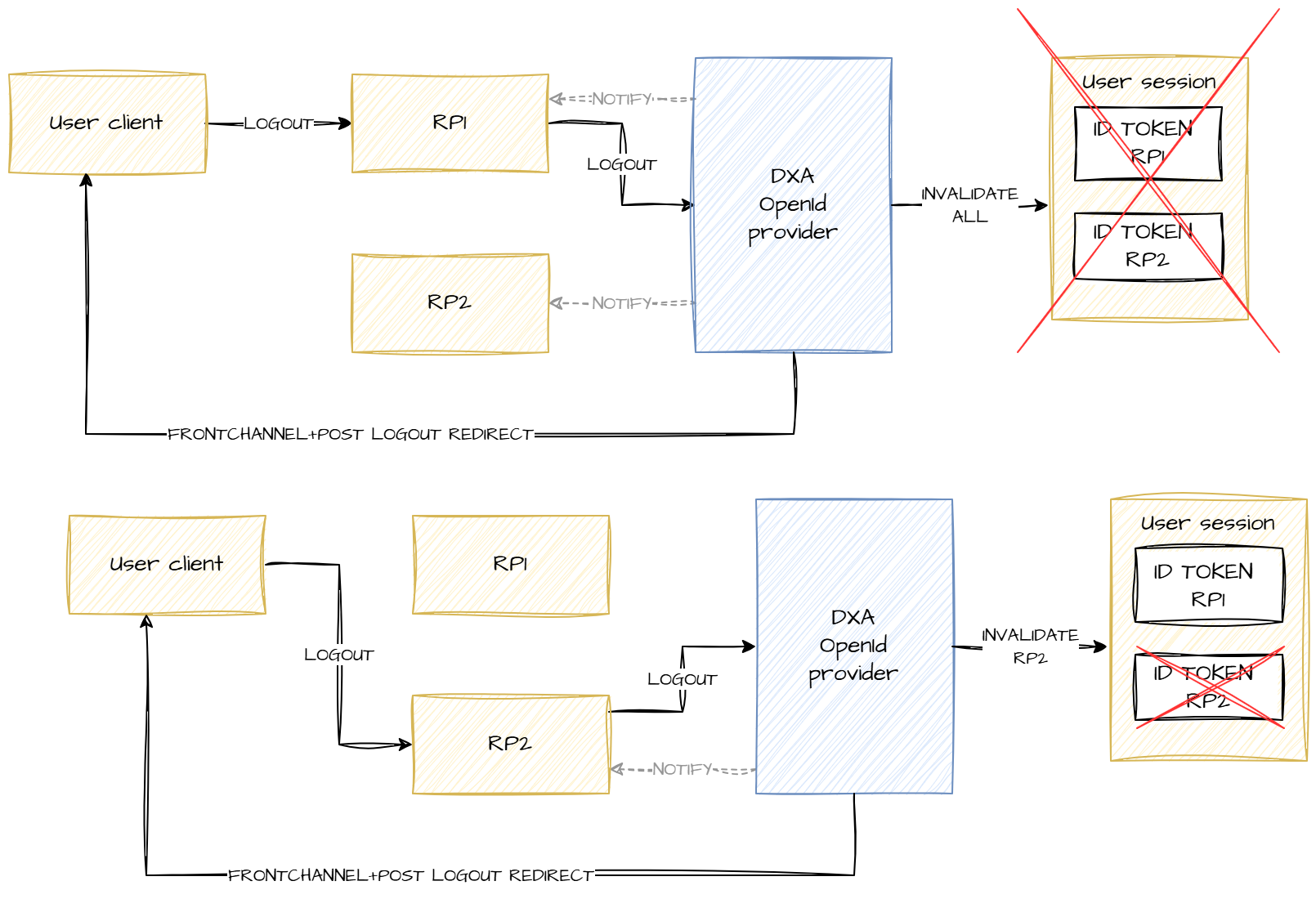
In some deployments, you may want certain RPs to have the ability to log out the DXA session and all other RPs, while other, less trusted RPs should only be able to log out their own tokens.
DXA supports this by using the scopes of the protected logout endpoint. You can define multiple Logout protected endpoints, each with different scopes, and each referencing a different Single Logout configuration.
When an RP initiates logout, DXA selects which logout configuration to use based on the scopes that were requested when the corresponding ID Token was issued. Typically, you give more trusted RPs an additional custom scope and configure the logout endpoint for that scope to use a more permissive logout configuration. The default logout endpoint (with no scopes) can serve RPs with restricted permissions.
Example use case
Consider two RPs: RP1 and RP2.
-
RP1 should be allowed to log out:
-
RP1,
-
RP2, and
-
the DXA session.
-
-
RP2, however, should only be allowed to log out itself (RP2) and should not be able to log out RP1 or the DXA session.
In the OAuth server configuration, create two Logout protected endpoints:
-
Protected endpoint A Scope:
full_logoutReferences a Single Logout configuration that logs out all clients in the session. -
Protected endpoint B Scope: (none) References a Single Logout configuration that logs out only RP2.
Logout resolution works as follows:
-
When RP1 initiates logout: DXA detects that the ID Token was issued with
full_logout. Therefore, it selects Protected endpoint A, using the configuration that logs out all clients. -
When RP2 initiates logout: The ID Token contains no additional scopes. DXA selects Protected endpoint B, using the configuration that logs out only RP2.
The flow is illustrated in the figure below: