DirX Access in the Role of OAuth Resource Server
This page is the single, comprehensive reference for DirX Access acting as an OAuth 2.0 Resource Server (RS): the architecture, request-processing/subject-resolution mechanics, core configuration, and the publication of standardized protected-resource metadata per RFC 9728.
For the scenarios that motivate using a PEP as an OAuth RS in the first place (cross-domain access, server-to-server communication, mobile applications), see PEP as OAuth Resource Server. For how this relates to the default cookie-based SSO session, see Session Management.
What this is, in one paragraph
Normally, a DirX Access PEP authenticates requests via the standard SSO mechanism (session cookie
configured authentication policies). Acting as an OAuth Resource Server is an alternative mode for a
given PEP: instead of (or in addition to) the SSO session, the PEP accepts a bearer access token
(a JWT, per RFC 9068 "at+jwt") on incoming requests, validates it itself (signature/encryption, audience,
expiry), and derives the requestor’s identity, roles and groups from its claims. This lets an
external OAuth client - a mobile app, a server-to-server integration, another DirX Access PEP acting as
OAuth client - call a DXA-protected API without ever going through a browser login. The PEP
can also publish standardized, machine-readable metadata about itself (RFC 9728) so that generic OAuth
clients can discover which Authorization Server to use, without any manual/out-of-band configuration.
Architecture and Request Processing
DirX Access Server does provide multiple endpoints via its REST APIs. To provide the standard approach to protection of REST APIs, DirX Access Server can take on the role of OAuth Resource Server enabling to follow the standard OAuth architecture and flows. The OAuth Authorization Server in this scenario can (but don’t need to) be provided by the DirX Access Server itself. The client applications can (but don’t need to) be also of DirX Access origin - e.g., all Single-page applications, such as DirX Access Manager and Credentials Manager.
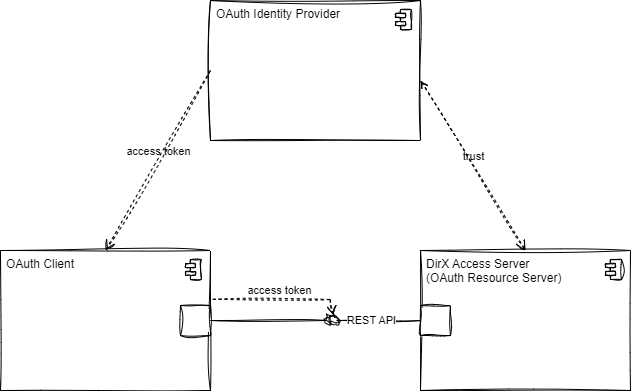
Following diagram depicts the DirX Access in the role of OAuth Resource Server in the scenario with DXA Manager.
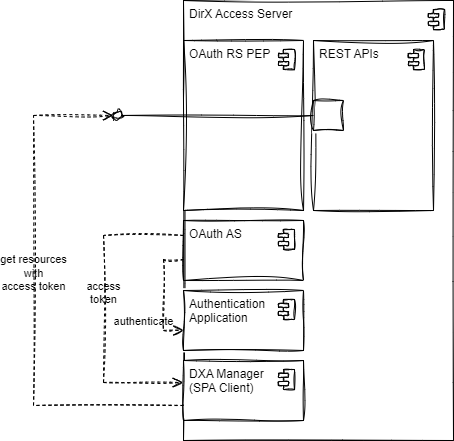
The OAuth Resource Server PEPs protecting the DXA Services container can take on the role of OAuth Resource Server. This role is enabled by configuring a reference to any “OAuth RS authentication method identifier”. If such a reference exists for given PEP, it behaves as a standalone OAuth Resource Server with a resource identifier equal to the “Resource URI” parameter of the corresponding authentication method. The whole algorithm of request processing by such PEPs is then highly dependent on the authentication method configuration.
The access token is transported via the Authorization header or as a Form-encoded body parameter, according to the RFC#6750. Although the Authorization Header theoretically does not impose a size limit on the JWT, in practice the browsers do limit this element on 8KB.
If the PEP’s OAuth RS authentication method identifier is configured, the resolution mechanism that assigns a requestor subject to the request is altered comparing to the standard processing. The most influencing part of the configuration is represented by the Do sessionless SSO property:
-
If switched off, the JWT is used for the primary subject resolution, while the request processing still includes the standard SSO mechanism with the subject resolution via the session cookie and authentication mechanism via existing policies. The standard SSO mechanism can also provide the complete subject resolution when no JWT is in place. Furthermore, the complete subject (including the part resolved from JWT; for example, JWT roles) is imprinted into the session cookie later and can be used during the whole session lifetime.
-
If switched on, the JWT is the only source of the subject. No SSO session is created and the JWT must be present upon each request. Even in this case the internal subject can incorporate additional information. The sub parameter can be used for retrieval of the persisted user data from the user repository, if the Do correlate user accounts and User account correlation properties are configured appropriately. Furthermore, the roles and groups from the JWT can be translated into internal roles and groups, if the Do imprint roles and Do imprint groups properties are switched on.
In both cases, if there’s no means to resolve the subject, DirX Access responds with the 401 response according to the RFC#6750: WWW-Authenticate: Bearer realm equal to the resource URI that shall be imprinted into the “audience” property of the JWT.
The JWT validation process follows the RFC#9068. Namely, the encrypted JWTs are decrypted, signed JWTs verified. Subsequently, the audience element is compared to the resource URI parameter configured for corresponding authentication method. The scopes parameter is not determining for the validation process.
The exp/nbf validity window is checked against the current time with a fixed clock-skew tolerance of one second;
this is a hard-coded implementation constant, not a configurable property - if the Authorization Server and DirX
Access server clocks can drift by more than about a second, ensure both are kept in sync (e.g., via NTP) rather than
relying on DirX Access to absorb larger skews.
Quick setup
This is the minimum path to turn one PEP-protected resource into a working OAuth Resource Server. Each step links to the full reference for that piece further down this page.
-
Register the Authorization Server’s metadata as an OAuth Server Metadata object paste its discovery document (issuer + JWKS, in JSON) into Metadata, or point Metadata URL at its
/.well-known/…endpoint for periodic refresh. This is where the Authorization Server’s token-signing key(s) come from - DirX Access verifies access-token signatures using the JWKS embedded in (or fetched via) this object’sMetadata/Metadata URL. -
(Optional) Set up a Crypto Container only if this resource needs to accept encrypted access tokens. Generate (or import) a single RS key pair for this purpose, then add it to the Crypto Container as both of the following matched entries - a
DECRYPTION_KEY_PAIRentry (the private key, so DirX Access can decrypt incoming tokens) and its pairedENCRYPTION_CERTIFICATEentry (the public key, as a certificate, so RFC 9728 can publish it atjwks_uri). -
Create an
AuthnMethodOAuth("OAuth Authentication Methods", menu:Configuration>Authentication>OAuth) with, at minimum:-
Protected resource URI - a unique,
https://URL identifying this resource, on the origin at which clients actually reach it (e.g.,https://my-server.example:10116). This is the value tokens must carry in theiraudclaim - see choosing a Protected resource URI below. -
OAuth Authorization Server Metadata Ids - reference the OAuth Server Metadata object from step 1.
-
Crypto Containers - reference the Crypto Container(s) from step 2, if you created one.
-
Leave Do sessionless SSO, Do imprint roles/Do imprint groups, and the user-correlation fields at their defaults for a first test; tune them once the basic flow works (see Configuration below for what each one changes).
-
-
Attach it to the PEP: on the
Pepprotecting the resource, set OAuth RS authentication method identifier to theAuthnMethodOAuthcreated in step 3. This is what actually turns the PEP into an OAuth Resource Server - without this reference, none of the above configuration has any effect. -
(Recommended) Exclude the RFC 9728 well-known paths from this PEP’s authorization/resource filter so discovery works even for a fully-protected resource - see Recommended: exclude the well-known paths from authorization below.
-
Verify end to end, in this order:
-
Call the protected resource with no token - expect
401 Unauthorizedwith aWWW-Authenticateheader containingresource_metadata=…. -
curlthatresource_metadataURL directly - expect a JSON document containing"resource": "<your Protected resource URI>"and (if configured)authorization_serversandjwks_uri. -
Call the protected resource again with a real access token from the Authorization Server - expect a normal, successful response. If it still fails, check the
typJOSE header first (see Configuration below) - it is the single most common integration gap.
-
Configuration
PEP
To enable the role of OAuth Resource Server, the concerned resources have to be protected by a PEP with configured “OAuth RS authentication method identifier”. The rest of the configuration is done via the referenced authentication method.
OAuth Authentication Method
-
Do sessionless SSO
-
Whether or not this authentication method enforces the internal subject to be part of an SSO session or not. If true, any request bound to this authentication method (typically via the PEP) takes the data about the requestor from the JWT and does not perform the traditional SSO in the sense that:
-
SSO session is not taken into account even though existing and part of the request (e.g., in the form of session cookie),
-
no new SSO session is created. The requestor data can be enriched from other sources (e.g., with persisted user account data) no matter the value of this parameter.
-
-
-
Protected resource URI
-
URI identifying the Resource Server that has to be present in the received access token in the
audclaim. This value is also the base from which OAuth 2.0 Protected Resource Metadata (RFC 9728) is derived and published - see OAuth 2.0 Protected Resource Metadata (RFC 9728) below for the full requirements and derivation rules.
-
-
OAuth Authorization Server Metadata Ids
-
List of trusted Authorization Servers. Their metadata (issuer, JWKS) is loaded and cached so that the token’s signature can be verified against the referenced Authorization Server’s published keys.
-
-
Do imprint roles
-
Whether or not to imprint roles from the OAuth token’s
rolesclaim into the roles assigned to internal subject. -
Role format (optional) - when set, each role value from the token is reformatted using this pattern before being imprinted (placeholder
#1is replaced by the role value itself,#2by Group domain, see below). If left empty, the raw string value from the token’srolesclaim is imprinted unchanged.
-
-
Do imprint groups
-
Whether or not to imprint groups from the OAuth token’s
groupsclaim into the groups assigned to internal subject. -
Group domain / Group format (both optional) - analogous to Role format above, but applied to the values of the token’s
groupsclaim (#1group value,#2domain). These only affect how the OAuth-sourced groups/roles are formatted; see Best practices: Group and role imprinting below for how this interacts with application-repository (SCIM) groups.
-
-
Match OAuth groups with AppRepo groups
-
Whether or not the groups received in the token are also looked up as application-repository (SCIM) groups, so that any roles assigned to a matching application-repository group are additionally imprinted onto the subject (in addition to whatever the token’s own
rolesclaim yields). See Best practices: Group and role imprinting below - this only has an effect if Do imprint groups is also on, and only if the corresponding cluster-wide Application Repository settings are configured to match.
-
-
User Correlation
-
When Do correlate user accounts is switched on or the User correlation strategy is Mandatory/Optional, the fields User account correlation and User profile correlation have to be configured in a way that the former refers to the LDAP attribute while the latter to the access token claim. The equality of values of these two then result in assigning the persisted user account (LDAP) attributes to the session.
-
-
Crypto Containers
-
The list of Crypto Containers holding this authentication method’s own RS key material, used for decrypting incoming access tokens and for RFC 9728
jwks_uripublication. Access-token signature verification uses the JWKS carried by (or fetched via) the OAuth Authorization Server Metadata Ids referenced above. -
Each Crypto Container entry needed here is one of a single RS key pair’s two matched halves:
-
DECRYPTION_KEY_PAIR(the private key) enables decryption of encrypted access tokens. -
Its paired
ENCRYPTION_CERTIFICATE(the public key) lets RFC 9728 publish this resource’s public key atjwks_uri.
-
-
Add both entries together for a fully working, publicly discoverable decryption key: the private half to actually decrypt, the public half so the Authorization Server can discover it via
jwks_uriand know which key to encrypt tokens with. -
Multiple decryption keys may be listed (e.g., during a key rotation window, both an old and a new RS decryption key pair). If the access token’s JOSE header carries an
x5t#S256(X.509 certificate SHA-256 thumbprint) parameter, DirX Access picks the matching decrypter directly; otherwise it tries every configured decrypter in turn until one succeeds. The samex5t#S256matching applies to signature verification against the JWKS from the OAuth Server Metadata object, so an old and a new AS signing key can likewise coexist there during a rotation.
-
-
Do require signing
-
If true, the access tokens have to be signed, otherwise invalid.
-
-
Do require encryption
-
If true, the access tokens have to be encrypted, otherwise invalid.
-
|
Regardless of the above settings, DirX Access always requires the access token’s JOSE header |
Best practices: Group and role imprinting
-
Formatting alone (
Role format,Group domain,Group format) never touches the application repository. These three fields only control the textual shape of the roles/groups imprinted directly from the token’sroles/groupsclaims (via the#1/#2placeholders) - they take effect purely from Do imprint roles/Do imprint groups being on and have no dependency on any other cluster setting. -
Match OAuth groups with AppRepo groupsis a second, independent mechanism layered on top ofDo imprint groups, and it silently does nothing unless several cluster-wide Application Repository settings line up with it. When switched on, DirX Access takes each formatted group from the token (i.e., after applying this authentication method’s own Group format/Group domain) and tries to look it up as an application-repository (SCIM) group, to pull in any roles assigned to that group. This lookup only succeeds if the resulting group’s format/domain exactly match the cluster-wide Application Repository settings:-
Enable application-repository groups (
Cluster > Application Repository) must be switched on - otherwise the lookup is skipped entirely, silently, no matter what is configured on the authentication method. -
This authentication method’s Group format and Group domain must be configured to produce exactly the same group identity as the cluster’s Group format (application-repository groups) and Group domain (application-repository groups) settings (an empty/
nullvalue on either side must match an empty/nullvalue on the other side) - otherwise DirX Access will not recognize the token’s groups as application-repository groups at all, and the lookup is skipped for every group. -
For the application-repository group’s own roles to also be imprinted (not just the group membership), both Enable application-repository roles and Resolve group roles (application-repository groups) must additionally be switched on.
-
For nested/parent groups of a matched application-repository group to also be resolved and imprinted, Resolve group membership recursively (application-repository groups) must be switched on too.
-
-
Practical recipe: if the goal is "map OAuth token groups onto our existing SCIM/application-repository group-role model", set this authentication method’s Group format/Group domain to be byte-for-byte identical to the cluster-wide Group format (application-repository groups)/Group domain (application-repository groups), then enable Do imprint groups, Match OAuth groups with AppRepo groups, Enable application-repository groups and Enable application-repository roles + Resolve group roles (application-repository groups) together. If the intent is instead "just pass through whatever roles/groups the token itself asserts, with no application-repository involvement", leave Match OAuth groups with AppRepo groups off and rely on Do imprint roles/Do imprint groups (with Role format/Group format purely cosmetic) alone.
OAuth 2.0 Protected Resource Metadata (RFC 9728)
DirX Access can also publish standardized metadata about a protected resource, per RFC 9728: OAuth 2.0 Protected Resource Metadata, at a well-known address derived from the resource’s Protected resource URI. This lets a generic OAuth client (for example, an MCP client) discover, without prior manual/out-of-band configuration:
-
which Authorization Server(s) are trusted for this resource,
-
how the access token is expected to be presented (bearer methods),
-
where the resource’s public keys can be retrieved (
jwks_uri), -
optional descriptive information (name, documentation, policy/terms-of-service links).
It is triggered the moment such a client receives a 401 response: the WWW-Authenticate challenge
header points it at the metadata document, which in turn tells it which Authorization Server to use.
|
DirX Access previously implemented an early, pre-standard draft of this specification
( |
Protected resource metadata fields
Publication of protected resource metadata is entirely driven by the configuration of the same
AuthnMethodOAuth authentication method referenced as the PEP’s OAuth RS authentication method (see
Configuration above). To enable metadata publication for a given protected resource, the PEP
protecting it must have an OAuth RS authentication method identifier configured. If this field is
unset, the PEP is not an OAuth Resource Server and no well-known metadata is served for it.
The following fields control what is published:
-
Protected resource URI (
resourceUri, required) - this is both the resource identifier compared against the access token’saudclaim, and the base value from which every well-known URL described below is derived. Per RFC 9728 section 1.2, for full conformance this value:-
must be an
https://URL, -
must not contain a URL fragment,
-
should be hosted on the PEP’s own externally-addressable origin - i.e., the scheme, host and port at which clients and Authorization Servers actually reach this protected resource.
Only the
https://scheme and no-fragment aspects are automatically checked (a startup warning is logged if violated; the configuration is not rejected, to avoid breaking pre-existing deployments). The "own origin" aspect cannot be automatically verified - the server has no reliable way to know its own externally-reachable hostname - so it is the administrator’s responsibility to set Protected resource URI to the exact origin the resource is actually reachable on. A wrong value here makes DirX Access advertise and serve metadata and a JWKS location for an identity it does not actually own, so treat this field as load-bearing configuration, not a free-form label, once RFC 9728 publication matters to you.
-
-
Resource name (
resourceName, optional, with a matching#lang-suffixed localized-variant field)-
a human-readable name for the resource, published as
resource_name.
-
-
Resource documentation (
resourceDocumentation, optional, + localized variant) - a documentation URI, published asresource_documentation. -
Resource policy URI / Resource terms-of-service URI (
resourcePolicyUri/resourceTosUri, optional, + localized variants) - published asresource_policy_uri/resource_tos_uri. -
Crypto containers identifiers - the same crypto containers already used for decrypting incoming access tokens (not for JWT signature verification, which instead uses the JWKS from the referenced OAuth Authorization Server Metadata Ids - see Configuration above). Any certificate of type
ENCRYPTION_CERTIFICATEpresent in these containers is published (as a JWK) at the resource’s ownjwks_uri. Certificates of typeVERIFICATION_CERTIFICATE(the Authorization Server’s own token-verification keys) are not published here - publishing them would misrepresent them as the resource’s own keys. If no encryption certificate is configured,jwks_uriis omitted from the metadata entirely rather than pointing at an empty or non-existent document.
Fields that RFC 9728 defines but DirX Access cannot honestly claim support for are handled as follows, and are not configurable:
-
scopes_supportedis not published - DirX Access does not enforce or track OAuth scopes at the Resource Server layer at all (authorization decisions are made separately by the XACML PDP, not by matching token scopes), so there is no scope list DXA could honestly declare as "supported" by this resource. Declaring one would misrepresent a capability DXA doesn’t have, so the field - and the corresponding configuration - was intentionally removed rather than kept as an administrator-supplied, purely declarative value. -
tls_client_certificate_bound_access_tokensanddpop_bound_access_tokens_requiredare always published asfalse- DirX Access has no mTLS token-binding validation and no DPoP implementation. -
dpop_signing_alg_values_supportedandauthorization_details_types_supportedare never published (DPoP and Rich Authorization Requests are not implemented). -
signed_metadata(RFC 9728 section 2.2) is not supported - DirX Access has no Resource-Server signing key available in its crypto configuration (only AS-verification-certificate truststores and RS-encryption keystores).
Well-known endpoints served
Given a Protected resource URI of, for example, https://my-server.my-company.example:10116/odata4/config,
DirX Access serves:
-
Metadata document at the RFC 9728 section 3.1 path-inserted form - the well-known suffix is inserted immediately after the origin, before the resource’s own path:
https://my-server.my-company.example:10116/.well-known/oauth-protected-resource/odata4/config -
JWKS document (the resource’s own encryption keys, when any are configured) at:
https://my-server.my-company.example:10116/.well-known/oauth-protected-resource/jwks.json/odata4/config
If Protected resource URI has no path component (i.e., it is just an origin), the well-known suffix
is served with no further path appended, e.g. https://host:port/.well-known/oauth-protected-resource.
|
Only this RFC-conformant, path-inserted form is served. An earlier, non-standard form
( |
Both endpoints:
-
Are subject to a strict resource-path consistency check (RFC 9728 section 3.3): the
<resource-path>segment of the incoming request must be identical to the path component of the resolved PEP’s configured Protected resource URI - not merely a sub-path of it. A mismatch results in404 Not Found, rather than accidentally serving one resource’s metadata (or keys) under a path belonging to another resource (the impersonation risk RFC 9728 section 7.3 warns about). -
Return a
Cache-Control: max-age=3600header on success, since this document changes rarely and clients/Authorization Servers are expected to cache it.
Discovery flow: the WWW-Authenticate challenge
When a request to an OAuth-RS-protected PEP has no token, or an invalid/expired one, DirX Access
responds 401 Unauthorized with a WWW-Authenticate header (per RFC 6750/9110 quoting rules). This
header now also carries the RFC 9728 section 5.1 resource_metadata parameter, pointing the client at
the metadata document described above:
WWW-Authenticate: Bearer realm="https://my-server.my-company.example:10116/odata4/config",
  error="invalid_token", error_description="...",
  resource_metadata="https://my-server.my-company.example:10116/.well-known/oauth-protected-resource/odata4/config"
The resource_metadata URL is computed by the exact same derivation logic that decides what the
metadata endpoint itself serves - the two are structurally guaranteed to always agree, so a client
following this header can never be pointed at a document that isn’t actually served.
|
The |
Best practices
-
One resource identity per
resourceUri, one PEP per resource identity. The resource-path consistency check (RFC 9728 section 3.3, well-known branch) requires an exact path match against the configured Protected resource URI - not a prefix match, however it is likely to be changed (part of drafted changes) as that is not sustainable. The metadata URI and JWKS URI are derived from the Protected resource URI and are not configurable. -
If several applications truly share one token/resource identity (for example, several web apps that should all be addressable with the same access token), do not rely on server-side leniency to achieve this - there is none, by design, on the well-known-document branch. Instead, configure each of those Multi-PEP-assigned applications with an OAuth RS authentication method whose Protected resource URI resolves to the same well-known metadata URL, and let the client’s own prefix-based matching resolve sub-paths against that shared base. This is exactly the mechanism the
resource_metadatachallenge header (see Discovery flow above) is designed to support. -
Add /.well-known prefix to resource filter of DXA PEP. It is recommended to add the /.well-known or prefix to the configuration of default PEP that intercepts all requests to the DXA server. This is to ensure that the /.well-known/oauth-protected-resource and /.well-known/oauth-protected-resource/jwks.json endpoints are not blocked by the PEP and are reachable by the clients. Otherwise, the clients will not be able to discover the resource metadata and the JWKS document, which will result in failed OAuth flows.
-
Verify with the actual served URL, not just the configuration screen. Since three different outputs now derive from a single
resourceUrivalue (the resource identity compared againstaud, the served well-known metadata/JWKS location, and the advertisedresource_metadatachallenge URL), a misconfigured value has a wider blast radius than before RFC 9728 support was added. After configuring a new OAuth-RS-protected and PEP exclusion filter, fetch the derived well-known URL directly to confirm it resolves and returns the expectedresourcevalue before relying on it in production.
Migration from the pre-RFC draft implementation
Earlier DirX Access releases served metadata only at a non-standard, suffix-appended well-known form
(https://host/<resource-path>/.well-known/oauth-protected-resource), and did not send the
resource_metadata challenge parameter. Both of these have changed:
-
The suffix-appended form has been removed (not merely deprecated) and replaced by the RFC 9728 section 3.1 path-inserted form described above. If any existing integration hardcodes the old URL shape, it must be updated to use the new one - no server-side fallback is provided.
-
The JWKS document previously published a mix of the Authorization Server’s verification certificates and the resource’s own keys; it now publishes only the resource’s own encryption certificates. If your resource has no encryption certificate configured, expect
jwks_urito be absent from the metadata rather than pointing at an (previously non-empty) key set. -
Two obsolete draft-only fields (
resource_encryption_alg_values_supported,resource_encryption_enc_values_supported) and one mislabeled field (resource_signing_alg_values_supported, which was actually derived from the Authorization Server’s verification certificates rather than any signing capability of the resource itself) have been removed from the published document entirely.
Review any client, script, or monitoring check that depended on the old well-known path shape or on the removed/changed fields before upgrading.