Setting up the Resolution Service as a Linux Daemon
This document describes how to set up the Resolution Service as a Linux daemon. To use the resolution service with a DXI linux installation, the process needs to be daemonize-d. It is done by configuring a daemon with a Systemd configuration file.
Execute the following steps to get the Resolution Service running:
Set Up the systemd Service
The commands bellow must be executed as the root user.
-
Adjust the file
dxiresolution.service
Please be aware that before starting the setup, the variables in the file have to be adjusted to Your system accordingly (You can find it under the installation folder of the resolution service (<dxi_install_path>\services\resolution\resolution-9.0-SNAPSHOT e.g))
User: the user that will run the service, it should be the same user that runs the DXI installation
Group: the group that will run the service, it should be the same group that runs the DXI installation
WorkingDirectory: the folder where service was extracted (<dxi_install_path>\services\resolution\resolution-9.0-SNAPSHOT e.g)
ExecStart: the command to start the service, it should be adjusted to the location path of the java version installed on your system.
-
Copy the Service File
Copy the dxiresolution.service from [dxi_install_path\services\resolution\resolution-9.0-SNAPSHOT\resolution-9.0-SNAPSHOT] or from the folder where you extracted resolution-9.0-SNAPSHOT.zip, depending on your setup,
to [<DXI_INST_PATH>/etc].
-
If you are logged in as
qametaor Your suer configured in the service file above, usesuto switch to therootuser -
Make a softlink under [/etc/systemd/system]:
   	cd /etc/systemd/system
ln -s <DXI_INST_PATH>/etc/dxiresolution.service-
reload the systemctl:
systemctl daemon-reload-
to start the service:
systemctl start dxiresolution.service-
to see its status (it should be active, in green status):
systemctl status dxiresolution.service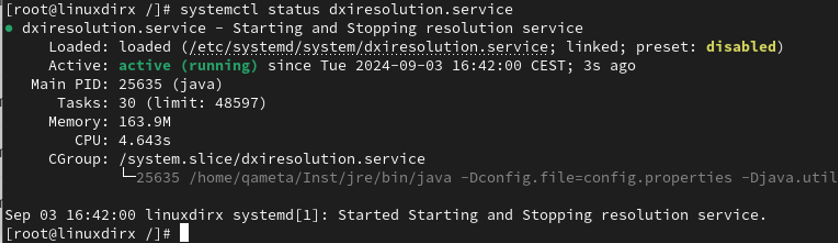
-
You can also verify that the Resolution Service is the only consumer by Verifying Consumer in ActiveMQ
-
to stop the service:
-
systemctl stop dxiresolution.service-
By each modification of the 'dxiresolution.service' file the steps from 'reload' above should be repeated. Do not forget that You have to adjust the copied 'dxiresolution.service' file in <DXI_INST_PATH>/etc.