Monitoring and Finishing a Campaign
The following diagram provides an overview of the states of a campaign:
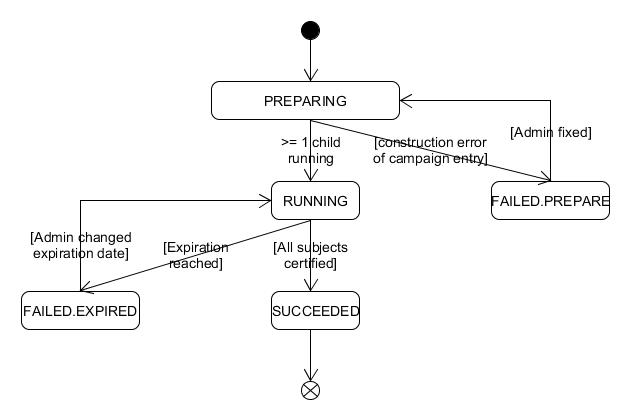
Campaign Workflow Overview
-
When the Certification Campaign workflow successfully creates at least one certification task, the campaign state becomes RUNNING.
-
If no task is created, the state is set to FAILED.PREPARE.
-
The administrator (campaign owner) can fix any issues and manually set the state to PREPARING.
-
On the next run, the workflow attempts to start the campaign.
-
-
When the campaign reaches its Due Date:
-
The workflow applies changes from all finished certification tasks.
-
If no task is finished, the campaign state changes to SUCCEEDED.
-
In both cases, the administrator can extend the campaign by:
-
Updating the due date.
-
Setting the state back to RUNNING.
-
The following diagram shows the states of a single certification task:
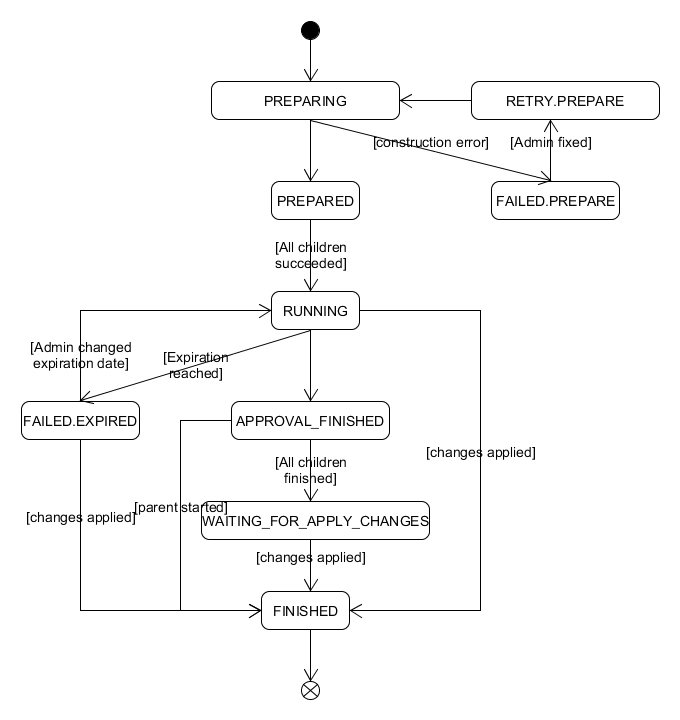
Certification Task Workflow
-
If a task cannot be created successfully:
-
The state is set to FAILED.PREPARE.
-
The administrator can fix issues and set the state to RETRY.PREPARE.
-
On the next run, if the task starts successfully, the state becomes RUNNING.
-
-
The PREPARED state:
-
Temporary state used when multiple approvers require additional tasks.
-
-
When the approver certifies all assignments:
-
The task state changes to APPROVAL.FINISHED.
-
-
If the task reaches its Due Date without completion:
-
The state changes to FAILED.EXPIRED.
-
The administrator can:
-
Extend the due date.
-
Reset the state to RUNNING to allow completion.
-
Campaign Completion
-
When the campaign reaches its Due Date:
-
All running tasks are set to FAILED.EXPIRED.
-
The workflow applies changes based on the Apply Changes field.
-
After changes are applied, certifications move to FINISHED.
-
-
Special states:
-
WAITING.FOR.APPLY.CHANGES: Transient state (currently unused).
-
If uncertified assignments remain at the due date:
-
The certification moves to FINISHED.
-
-
If changes cannot be applied:
-
The certification moves to FAILED.APPLY.CHANGES.
-
-