Overview
DirX Identity provides significant extensions to its load balancing and thus also to its high availability features. As of V8.3, the dynamic load balancing features for Java-based workflows are improved once more and so are the high availability features. As a downside, the recovery features for Tcl-based workflows are slightly reduced.
DirX Identity high availability still focuses on high availability within one site. The implemented solution requires file-based repositories to be accessible from the message brokers, which is usually accomplished with highly-available storage systems in one site. However, this configuration can be a significant cost and performance factor for remote sites, and thus may not always be available.
Workflow implementations that may limit the deployment of high availability include:
-
Workflows that import from a file or export to a file, including provisioning workflows, report producers, history record exporters and others.
-
Tcl-based workflows with intermediate files, where the activities are distributed across systems.
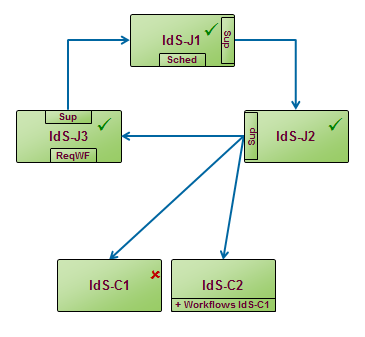
For automatic fail-over DirX Identity supports Circular monitoring. In Circular monitoring each IdS-J server monitors the state of another server, altogether building a circle. If a monitored server is no longer available, the monitoring server takes over its functionality and the messages not yet fully processed. One of the IdS-J servers monitors all the IdS-C servers. If an IdS-C server is no longer available, it moves the Tcl-based workflows to another IdS-C server.
Note that using DirX Identity’s high availability features requires an add-on license that requires the business or the professional suite as a pre-requisite.
Note, too, that the Tcl-based supervisor provided in previous DirX Identity versions cannot be deployed with the new Java-based supervisor, because it also monitors the IdS-C servers and moves the messaging service and Tcl workflows and thus conflicts with these operations in the Java-based supervisor. However, if you have deployed the Tcl-based supervisor, you can continue to run it as long as you don’t activate the Java-based supervisor.
The following chapters describe in more detail how to install the high availability features as a whole and then how to configure them.
Relevant Server Components
The following diagram gives an overview of the Java server components that are important for understanding High Availability:
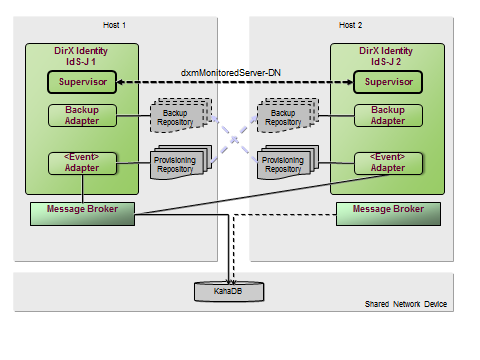
Each Java server is connected to the message broker, realized by Apache ActiveMQ. All JMS clients send their messages to this broker and receive their messages from it. The broker stores the messages in his (shared) repository, implemented by the Apache component KahaDB. For High Availability the repository folder should be located on a shared network device.
The JMS adaptors (for provisioning requests, entry change or password change events) read messages from the message broker and store them in their own local file repository. The adaptors delete a message from their repository only when it is completely processed by the corresponding workflow. The reason for the separate repository is a JMS standard feature: when an adaptor acknowledges a message to the broker, the broker deletes this message and all that were received before. But DirX Identity cannot guarantee that message processing is finished in the order they are obtained from the broker. Processing for some messages takes longer than others. Sometimes errors occur and processing has to be repeated.
If High Availability is activated, each Java server starts its Backup Adaptor. This Backup Adaptor receives messages from the normal JMS adaptors on the monitored Java server and stores them in its local backup repository. When a provisioning or password adaptor on IdS-J2 receives a message from the broker, it immediately sends them to the Backup Adaptor on IdS-J1. When the message has been processed, the JMS adaptor removes it from its local repository and also instructs the Backup Adaptor to remove it from the backup repository on IdS-J1.
When automatic fail-over is configured, each Java server starts its local supervisor. The supervisor monitors the Java server identified by the Monitored Server link. In the diagram above, IdS-J1 monitors IdS-J2 and vice versa IdS-J2 monitors IdS-J1.
A second message broker can be deployed on any host with a DirX Identity Java server or on any other external server. Only one message broker has exclusive access to the message repository, all other message brokers are locked out and haven’t started their connectors for the client. In case the message broker crashes, the database lock is removed, and the next message broker gets the exclusive access to the database (and starts his connectors). There is no algorithm of who is the next broker to take over; it’s simply the fastest one. The failover time is about 20 seconds.
Automatic Fail-over with Circular Monitoring
This section describes how to configure the Java-based servers so that they monitor each other as well as the C++-based servers and automatically move functionality from a failed server to an active one.
The message broker setup is independent of this and is used like a black box. Failover of the message broker is done automatically by means of ActiveMQ.
The following diagram illustrates this deployment:
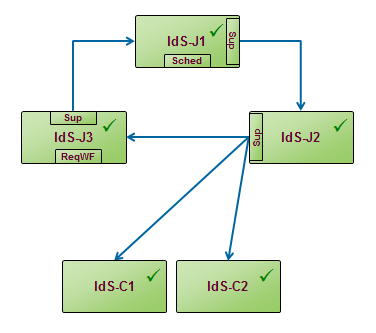
The deployment comprises several Java-based servers and two C++-based servers. The Java-based servers monitor each other in a circle: IdS-J1 monitors IdS-J2, IdS-J2 monitors IdS-J3 and IdS-J3 monitors IdS-J1. IdS-J1 hosts the scheduler for the Java workflows, IdS-J2 monitors all C++-based servers and IdS-J3 processes the request workflows.
Use DirX Identity Manager to configure this scenario as follows:
-
For each of the Java-based server entries in the Connectivity database:
-
Activate Automatic Monitoring.
-
Enter the monitored Java-based server.
-
Enter the supervisor configuration and reference it from each Java-based server. The supervisor configuration entries are Configuration → Java Supervisors (see DirX Identity Manager’s Connectivity View → Expert View). Create your own folder – preferably one per domain – and a new configuration entry. The important fields to be entered are the Monitoring Interval, the Retry Count and the fields for defining the mail. The supervisor sends an e-mail whenever it considers a server to be unavailable and moves functions to another one.
We recommend using the same supervisor configuration for all Java-based servers.
-
For exactly one Java-based server, check Monitor C++-based Servers.
-
For exactly one Java-based server set the flag for the scheduler.
-
For exactly one Java-based server set the flag for request workflow Timeout checker.
No special configuration is needed for the C++-based servers: just distribute the Tcl-based workflows and their activities according to your needs.
A supervisor considers a monitored server to be down when it does not respond to a JMX monitor operation (getState) after several (retryCount) repetitions or when the returned state is below a certain limit (4 in a range of 0 to 10). Note that the supervisor recognizes when a server has been intentionally stopped and does not consider this to be a failure. In other words, when a server is intentionally stopped, the supervisor does not automatically take over its services. The following diagram illustrates an example.
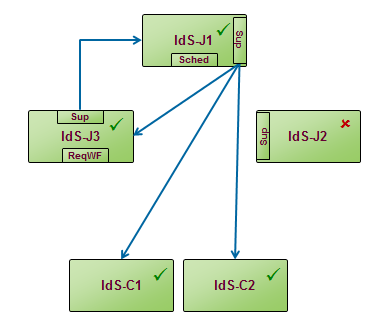
In this example, let’s assume that IdS-J2 is no longer responding. IdS-J1 takes over the monitoring tasks of the IdS-J2 supervisor: it monitors IdS-J3 and all adaptors that are active on IdS-J2, but not on IdS-J1.
The supervisor changes the configuration accordingly in the Connectivity database and requests its hosting IdS-J server to start the additional adaptors.
If IdS-J1 would fail, then IdS-J3 would take over especially the scheduler. Analogous, if IdS-J3 fails, then IdS-J2 would take the responsibility for the request workflows.
When IdS-J2 comes up again, the previous configuration is not automatically restored. The administrator must move the adaptors, the scheduler and/or the request workflow service back to IdS-J2. This is not so for the monitoring tasks, because the supervisor does not change the configuration regarding monitoring. Therefore, IdS-J2 will again monitor IdS-J3 and the IdS-C servers. IdS-J1 continues to monitor IdS-J2 and stops monitoring the others as soon as it considers IdS-J2 to be up and running.
When IdS-C1 fails to respond to the JMX getState() operation, IdS-J2 moves the schedules, workflows and activities to IdS-C2: it changes the configuration in the connectivity database accordingly and requests IdS-C2 to re-start and evaluate the configuration again.